
GEOS Applications
Official Berkeley Softworks Offerings
Here is a list of applications from Berkeley Softworks (BSW):
geoPaint
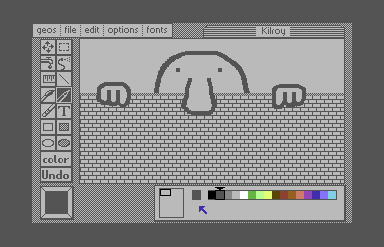
The first of the two "killer apps" that came bundled with GEOS, geoPaint is a high-resolution drawing program heavily inspired by MacPaint. Unlike other C64 drawing programs that operate on the C64's 320x192 high-resolution screen, geoPaint lets you work on a full-sized US Letter document (8.5"x11"). If you use the navigation tool, you can see that the visible work area represents around 10% of the total document size.
geoPaint can be used to put the finishing touches on a geoWrite document that has been transformed with one of the special printer drivers generated by the Paint Drivers application.
geoWrite
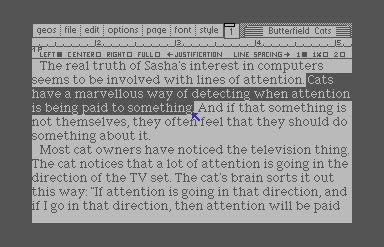
The second killer app, geoWrite, introduced Commodore users to the modern desktop publishing convention of "What You See Is What You Get" (WYSIWYG). I cannot overstate what a revolutionary change it was to go from monospaced dot-matrix printing to this modern approach with proportional fonts, text styling, and immediate visual feedback.
geoWrite's visible work area is only four inches wide, so typing out a full-width document causes the display to flip back and forth between the two halves of the page, a process which is both distracting and annoyingly slow. GEOS users quickly learned to eliminate screen flipping by setting narrow margins before starting to write. After all the text is entered, the margins can be readjusted to use the full width of the page.
When managing your work disks, pay attention to your fonts. If your font files are not on the same disk as your document, geoWrite will revert to displaying your document in the system font, 9-point BSW.
geoSpell
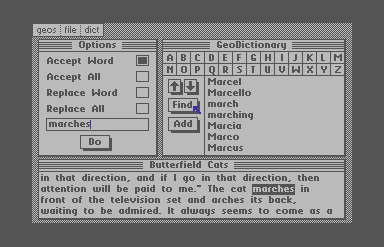
geoSpell is a standalone application that spell-checks geoWrite documents. To run a check, your work disk must contain the geoSpell application, the document you want to check, the GeoDictionary data file, and an optional "personal" dictionary.
The spell-check process is slow: geoSpell takes 15 seconds to launch from a 1581, and a further 70 seconds are required to check a 200-word document. Using the RAM disk as your work disk reduces the overall run time to about 45 seconds, which is still slow. It's not practical to run continuous spell checks as you work; you'll want to wait until your document is complete before running the spell check.
geoSpell flags words it doesn't recognize but the dictionary is incomplete. It couldn't find a match for "marches" although it did know "march" and "marching". geoSpell doesn't offer suggestions, but it does provide a search tool so you can see what's in its dictionary. If a word is not found, the user is responsible for looking up the correct spelling in a physical dictionary.
I used to keep a personal dictionary of musical terms (typically Italian words that would not be in the base dictionary), and another of composer's names (because I could never quite seem to get "Tchaikovsky" right). It's a good idea to keep separate dictionaries for different topics, because if your personal dictionary gets too large, it can significantly slow down the spell-check process.
geoMerge
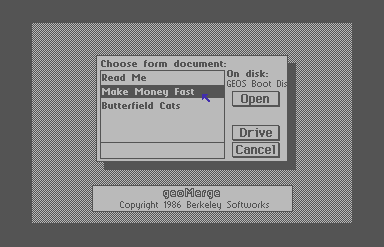
Mail merge software helps you personalize documents by combining two sources of information: a template document and an external data source like a CSV or spreadsheet. For example, if you have a form letter template and a mailing list, a mail merge program can automatically fill in the blanks and help you spam everyone in your address book. To use geoMerge, you must prepare two geoWrite documents: one form template, and one data file.
The merge form template geoMerge combines geoMerge data file format
geoLaser
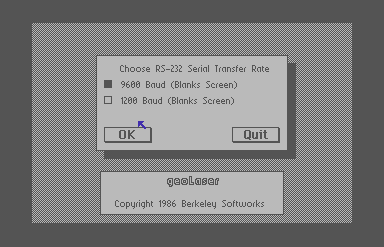
geoLaser is a utility for printing geoWrite documents on an Apple LaserWriter
printer connected via RS-232. To get high-quality documents printed at 300 dpi, you should use
the four native "LaserWriter" fonts included with GEOS 2.0: Times New Roman, Helvetica, Courier,
and Symbol (a math and science font that includes glyphs for Greek letters). Berkeley calls
these fonts LW_Roma, LW_Cal, LW_Greek, and LW_Barrows. Additional fonts are available separately;
look for the LW_ prefix on the font name.
geoLaser supports upscaled printing of GEOS's bitmap fonts but the printout will be limited to 80 dpi so the output will appear blocky and jagged.
Released in 1986 at almost $7000, the Apple LaserWriter was too expensive for the average home user. Today, it's even more unlikely that a hobbyist will have both a LaserWriter and the necessary RS-232 interface cable. Fortunately, Jim Collette wrote a patch utility called PS.Patch that updates geoLaser so that it generates PostScript files on disk.
Text Grabber
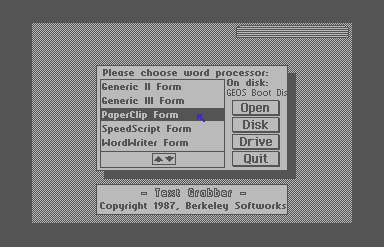
Text Grabber is a utility that converts non-GEOS word processor files into geoWrite format. GEOS includes templates for popular word processors such as Paperclip and SpeedScript, as well as a variety of "generic" templates to try if your source word processor is not directly supported.
This conversion utility serves two purposes. First, Text Grabber lets you import your existing word processor files into the GEOS ecosystem. Second, it provides you with a more efficient way to enter text—if you spend any time at all with geoWrite, you'll notice that text entry is slow and the typing feels "mushy". I used to write drafts in a native C64 word processor for speed, and only bring my document into GEOS when I was ready to make final edits.